
[#1] Safety Manager’s Vibe Coding: Building an AI Near-Miss Reporting System

VIBE CODING · SAFETY TECH · Field Practice
Safety Manager’s Vibe Coding: Field Experience Became Code
How a non-coder HSE professional built a near-miss reporting system
using AI-assisted development
I don’t know how to code. I can’t explain what React or TypeScript
really are. Yet I now have a fully functional near-miss incident
reporting system — complete with automatic image compression,
auto-save, AI risk analysis, real-time field validation, and server
submission. How was this possible? The answer is straightforward.
Domain expertise came before the code.

directly through vibe coding
1. Why This Had to Be Built
Near-miss incidents go unreported. More precisely,
they go unreported because reporting is too inconvenient.
Workers have to locate a paper form, fill in their name, and physically
submit it somewhere. When you experience a close call in the middle of
a task, most people won’t go through that process to report it.
As Heinrich’s Law tells us, behind every serious injury lie hundreds of
near-miss events. When those near-misses accumulate, patterns emerge —
which shift, which facility, which department is generating the most
hazard signals. But without data, you can’t see patterns. And data
comes from reporting.
Workers must be able to submit a report from their phone in under
one minute.
Names should be optional. Reducing psychological burden is essential
to improving reporting rates.
Photos must be attachable on the spot. A single field photo carries
more information than ten lines of a written report.
Finding an off-the-shelf solution that met all three criteria was
difficult. And even where solutions existed, customizing them to match
our specific facility structure and departmental hierarchy was not
straightforward. So I decided to build it myself — without knowing how
to code.
2. Vibe Coding: Stronger Domain Knowledge, Stronger AI Output
Vibe Coding is an approach where you build software by conversing with
AI. Instead of writing code directly, you describe what you want to
build and the AI generates and iterates on the code for you. You repeat
this cycle until the result meets your requirements.
Telling AI “build me a near-miss report form” produces a generic
result.
But phrasing it like this makes all the difference:
“This is a form field workers fill out on their phones. If they close
the browser mid-entry, the data needs to be saved. The reporter’s
name is optional. Images should be automatically compressed to reduce
server load. If a required field is missing, it should be immediately
highlighted, and there should be a confirmation dialog before
submission.”
The person who can write that paragraph is not a developer. It’s
someone who knows the field — who understands the conditions under
which reports are written, at what point a reporter gives up, and what
data is actually needed for root cause analysis.
That is the core of vibe coding.
AI writes the code; the human sets the direction.
The person who can set direction most precisely is the one who builds
better software. That ability is domain expertise — the professional
asset of every safety manager.
Tech Stack (selected and implemented by AI)
React
TypeScript
PrimeReact
react-hook-form
axios
browser-image-compression
localStorage
PHP
Gemini API
3. When the Safety Manager’s Assets Become Code
Every feature in this system has a reason behind it — not a technical
reason, but one rooted in field experience. Here is where each design
decision came from.
Workers won’t report if they have to put their name on it. This is
a fact confirmed directly in the field. The link between anonymous
reporting and higher reporting rates is a matter of psychological
safety — one of the foundational pillars of a strong safety culture.
For this reason, the reporter name field was designed as optional,
with a placeholder explicitly stating “Anonymous submission
available.”
Near-miss experience, witnessed incident, safety improvement
suggestion, other. Data is only useful if it’s categorized.
To be able to ask “which department submitted the most safety
improvement suggestions this month,” the classification structure
has to be in place from the start.
Location is the starting point of root cause analysis. Seeing where
reports cluster — which facility, which department — reveals where
interventions should be focused. Our actual facility names and
department structure were built directly into the system. The
inability to do this in off-the-shelf solutions was one of the
primary reasons for building our own.
Incident patterns correlate with time of day — immediately after
night shift changeover, post-lunch, near end-of-task. Time data is
required to generate meaningful trend analysis. One-hour increment
selection keeps input effort low.
A single field photograph contains more information than ten lines
of written description. However, mobile photos are large files that
impose server load and slow upload speeds. Automatic compression to
under 500 KB was implemented so reporters simply select a photo —
the system handles the rest.
If a phone call interrupts entry or a browser tab is accidentally
closed, losing all typed content typically means the report never
gets submitted. Auto-save eliminates this failure mode. The
progress indicator answers “how much more do I need to fill in?”
— reducing partial-completion abandonment. This is not UX theory;
it is a judgment call based on observed reporter behavior in the
field.
Collecting reports and stopping there is insufficient. The system
needs to drive toward corrective action — which means determining
risk level and identifying appropriate controls. The backend calls
Gemini AI with the incident narrative and field photograph for
automated hazard analysis. The analytical framework used is the
Hierarchy of Controls (Elimination → Substitution
→ Engineering Controls → Administrative Controls → PPE) — a
foundational principle of occupational safety and health practice.
What was passed to the AI was not coding knowledge, but this
analytical framework and contextual judgment. The safety manager’s
professional asset became the prompt.
4. Key Features Implemented
Displays in real time how many of the 6 required fields (incident
type, facility, department, date, time, description) have been
completed, as a percentage bar. Reporters can immediately see
what still needs to be entered.
Input data is automatically saved to the browser every 0.5
seconds. Reopening the page after closing it restores the
previously entered content and displays a notification. Photos
are not stored for security reasons; only text data is retained.
Images up to 10 MB are automatically compressed to under 500 KB
on upload. Reporters simply select a photo; a preview is
available before upload. A status message is displayed during
compression processing.
Attempting to submit with missing required fields highlights the
incomplete fields with a red border and auto-scrolls to the first
missing item. Reporters do not have to manually search for what
was left blank.
Pressing the submit button triggers a “Confirm submission?”
dialog. Both accidental submission and accidental form reset are
prevented.
Input data and images are transmitted to the server API.
Contextual guidance messages are displayed for network errors,
server response timeouts (30 seconds), and server-side errors,
ensuring reporters are never left without feedback.
Upon successful submission, the interface transitions to a
dedicated “Report Received” screen with an acknowledgment message
and a new report button. The transition eliminates any ambiguity
about whether the report was actually submitted.
Incident data and field photographs are transmitted via the PHP
backend to Gemini AI for automated hazard analysis. The analysis
output includes risk level (High / Medium / Low), recommended
controls structured by the Hierarchy of Controls (Elimination ·
Substitution · Engineering Controls · Administrative Controls ·
PPE), immediate corrective actions, preventive recommendations,
and a one-line summary for email notification. When a photograph
is included, the AI performs direct image analysis to identify
unsafe conditions and unsafe acts. API calls are handled
server-side (PHP); the frontend receives and displays the
results only.
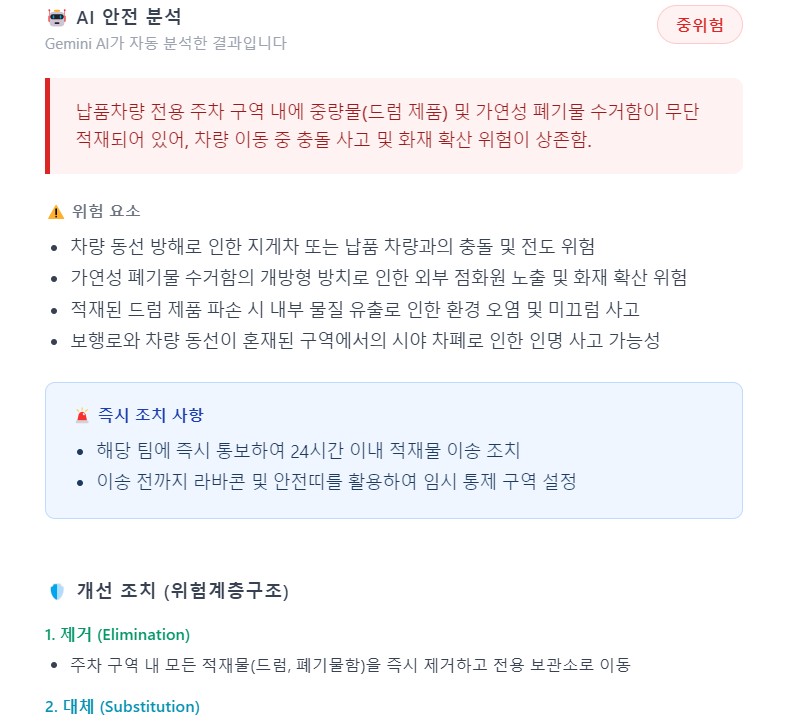
AI Risk Analysis Output — risk level determination, Hierarchy of
Controls-based corrective actions, and immediate response items
auto-generated
5. How to Use
The reporting process is four steps. One to two minutes on a mobile device is sufficient.
-
Select Incident Type
Choose from: near-miss experience / witnessed incident / safety
improvement suggestion / other. Reporter name is optional —
anonymous submission is fully supported. -
Enter Location and Date/Time
Select the facility and department, then enter the incident date
and time (1-hour increments). -
Write Description and Attach Photo
Describe the incident circumstances, contributing factors, and
outcome in free text. Attach a field photo if available.
Automatic compression handles file size — no manual resizing
required. -
Submit Report
Press “Submit Report” and confirm in the dialog. Once the
confirmation screen appears, submission is complete.
All entered data is auto-saved. Returning to the page
automatically restores the previous draft. Photos must be
re-attached.
6. What It Means for an HSE Professional to Build Their Own Tools
Building this system did not make me a developer. But something now
exists that didn’t before — a tool that fits our facility precisely.
Commercial solutions are built for generality. They have to work
across all industries and organizations, which means they fit none of
them exactly. Our facility names, our departmental structure, our
workers’ reporting habits — only an HSE professional embedded in this
organization knows these things, and only that person can build a tool
that truly reflects them.
Professional expertise sets the direction; AI builds the code in
that direction.
In vibe coding, what matters is not coding ability — it’s knowing
what needs to be built.
The people who know that are in the field.
This system is not finished. I want to build an administrative
dashboard for visualizing report data, and department-level and
time-of-day trend analysis. When near-miss data accumulates, it
becomes a genuine organizational asset. Having built the first tool
for collecting that asset — for now, that is enough.